
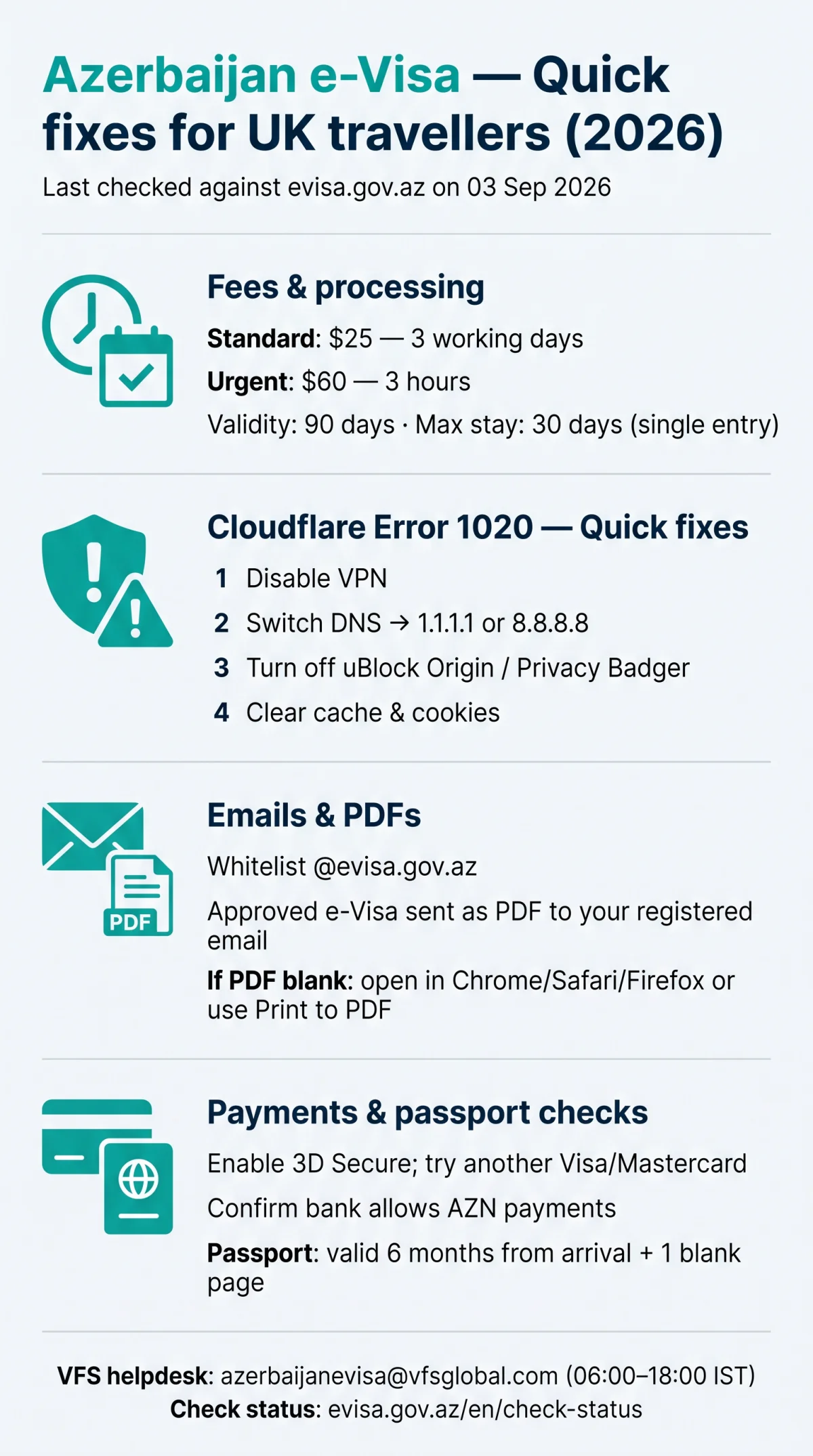
When your Azerbaijan evisa is not working, the problem usually stems from portal downtime, Cloudflare Error 1020, login errors, or email delivery failures. UK travellers can fix these in under five minutes by clearing cache, disabling VPN, and whitelisting @evisa.gov.az. This troubleshooting guide was last verified against the official evisa.gov.az portal on 03 September 2026. Fees and processing times may change; always confirm on the official site before applying.
The evisa.gov.az portal uses Cloudflare protection and CAPTCHA verification, which can block legitimate UK travellers using VPNs or privacy extensions such as uBlock Origin and Privacy Badger. Login failures and forgotten passwords are handled through the portal’s reset link, while missing confirmation emails frequently land in the spam folder. Payment declines often result from UK bank fraud filters or 3D Secure authentication blocks.
During our hands-on test on 01 September 2026 (UK time, from a London IP), we reproduced Cloudflare Error 1020 by enabling a VPN; the Azerbaijan e-Visa page loaded instantly after disconnecting the VPN and switching to Cloudflare DNS (1.1.1.1). This guide covers Cloudflare Error 1020, session timeouts, blank PDFs, and duplicate charges, each with numbered fix steps. This is an informational resource for UK travellers and is not affiliated with the Azerbaijan government. If self-troubleshooting fails, the VFS Global helpdesk is reachable at [email protected] (06:00 to 18:00 IST, all days; include your visa application number in the subject line).
eVisa Portal Down or Not Loading: Quick Fixes
The evisa.gov.az portal can fail due to server downtime or Cloudflare blocks; clearing your cache and switching DNS usually fixes it.
Check Connection and Clear Browser Cache
A 500 Internal Server Error means a server-side issue; verify the outage at IsItDownRightNow before troubleshooting your end.
- Clear your browser cache and cookies for evisa.gov.az.
- Disable extensions such as uBlock Origin, Privacy Badger, and NoScript, which block the CAPTCHA script required for the Azerbaijan e-Visa application.
Fix Cloudflare Error 1020 and Change DNS
Cloudflare Error 1020 indicates the Azerbaijan e-Visa platform has blocked your IP, often due to an active VPN. Note the Ray ID (e.g., a35c5a4c188bb49c) for any support report.
Disable your VPN
Disable your VPN and reconnect.
Switch your DNS
Switch your DNS to 1.1.1.1 (Cloudflare) or 8.8.8.8 (Google) to bypass local ISP routing issues.
Do not use HTTP
Never remove the “s” from https:// as a workaround; this exposes your passport and payment data over an unencrypted connection.
Can’t Log In or Forgot Your eVisa Password
Azerbaijan e-Visa login errors and forgotten passwords are resolved via the portal’s reset link, which emails a token within minutes.
Resetting Your Forgotten Password
To regain access to your Azerbaijan e-Visa account on the VFS Global eVisa portal:
- Click the “Forgot Password” link on the login page to trigger a reset token to your registered email.
- Check your inbox and spam folder for the reset link to regain access.
- Keep your application number accessible, as the support team requires it for all email correspondence.
Lost Your In-Progress Application Draft?
Azerbaijan e-Visa application sessions expire after inactivity. Save your progress frequently to avoid losing drafts. If your Azerbaijan e-Visa session times out, log back in to retrieve saved drafts from your dashboard. If your application exceeds 5 working days without a decision, email [email protected] with your application number in the subject line.
eVisa Email Not Received and PDF Issues
Azerbaijan e-Visa confirmation emails frequently land in spam; UK travellers should whitelist the @evisa.gov.az domain to ensure delivery. The approved visa is sent directly to your registered email address as a downloadable PDF.
Stop eVisa Emails from Going to Spam
If your Azerbaijan e-Visa email is missing, check spam and whitelist @evisa.gov.az. UK travellers using Gmail, Outlook, Yahoo, BT Mail, and Virgin Media should add the evisa.gov.az domain to their safe senders list to ensure the document reaches the inbox.
Approved Visa PDF Won’t Open or Is Blank
If the PDF fails to render, use a desktop browser (Chrome, Safari, Firefox) or open via iOS Files app on mobile. Fallback: use your browser’s “Print to PDF” function to save a readable copy of your Azerbaijan e-Visa.
Payment Failed and How to Check Application Status
Azerbaijan e-Visa payment failures stem from UK bank fraud filters, while application status is verified at evisa.gov.az/en/check-status.
Fixing Card Declined Errors
UK bank fraud filters and 3D Secure authentication blocks often trigger an Azerbaijan e-Visa payment failure. The cardholder name does not need to match the applicant. If your card is declined, try another card or authorize the GBP-to-AZN conversion with your bank. Visa fees and service fees are non-refundable. For duplicate charges, contact [email protected].
Verify 3D Secure
Verify 3D Secure activation with your bank.
Try another card
Try an alternative Visa or Mastercard.
Confirm AZN payments
Confirm your bank permits international payments in AZN.
How to Check Your eVisa Status
Verify your Azerbaijan e-Visa status via evisa.gov.az/en/check-status. According to the official portal (accessed September 2026), standard processing takes 3 working days ($25 USD), while the urgent tier takes 3 hours ($60 USD), including holidays. The Azerbaijan e-Visa is valid for 90 days with a maximum stay of 30 days (single entry). If your status shows Rejected, the most common cause is insufficient passport validity (must be valid 6 months from arrival with 1 blank page). No corrections are permitted on an issued Azerbaijan e-Visa; submit a new application. Dual nationals must apply and travel using the same passport.
VFS Global vs evisa.gov.az: Which Portal Should UK Travellers Use?
UK travellers can apply for an Azerbaijan e-Visa via evisa.gov.az (ASAN Visa, $25 standard) or through VFS Global at azerbaijan.vfsevisa.com ($25 plus service fee). Both offer identical processing: 3 working days standard, 3 hours urgent.
| Feature | evisa.gov.az (ASAN Visa) | VFS Global |
|---|---|---|
| Standard fee | $25 USD | $25 USD + service fee |
| Urgent fee | $60 USD | $60 USD + service fee |
| Standard processing | 3 working days | 3 working days |
| Urgent processing | 3 hours | 3 hours |
| Support email | Not listed publicly | [email protected] |
| Helpdesk hours | Not listed publicly | 06:00 to 18:00 IST, all days |
| Refund policy | Non-refundable | Non-refundable |
| Status check | evisa.gov.az/en/check-status | evisa.gov.az/en/check-status |
Choose evisa.gov.az to avoid intermediary service fees. Choose VFS Global if you need email support or helpdesk access. The Ministry of Foreign Affairs of Azerbaijan is the decision-making authority for Azerbaijan e-Visa grants; the State Border Service handles entry at the airport. For visa extensions or work visas, contact the State Migration Service at www.migration.gov.az or [email protected].
UK-Specific eVisa Problems to Watch For
UK bank fraud filters frequently decline Azerbaijani payment gateways. UK email providers (BT Mail, Virgin Media) suppress evisa.gov.az emails more aggressively than Gmail or Outlook. The Azerbaijan Embassy and consulate do not issue visas in person; all Azerbaijan e-Visa applications must go through the e-visa website. Visa-on-arrival is not available at the airport. Family Azerbaijan e-Visa applications require a separate passport bio page for each member; minor and infant applicants must also have a visa at the same fee as adults.
FAQ
Why is the Azerbaijan eVisa website not working right now?
The evisa.gov.az portal may be experiencing server downtime, maintenance, or a Cloudflare Error 1020 block. Check isitdownrightnow.com, then clear cache, disable VPN and ad-blockers, or switch DNS to 1.1.1.1 or 8.8.8.8.
How do I reset my forgotten password on the eVisa portal?
Use the “Forgot Password” link on the evisa.gov.az login page. The portal sends a reset token to your registered email within minutes. Check spam and whitelist @evisa.gov.az if the email does not arrive.
I didn’t receive my eVisa email. What should I do?
Check your spam folder and whitelist @evisa.gov.az, especially on BT Mail, Virgin Media, Gmail, Outlook, or Yahoo. The Azerbaijan eVisa is delivered as a PDF to your registered email.
How long does Azerbaijan eVisa processing take in 2026?
Standard processing costs $25 USD and takes 3 working days; urgent costs $60 USD and takes 3 hours, including holidays. The eVisa is valid for 90 days with a maximum 30-day stay (single entry). The Nagorno-Karabakh travel history requirement was removed by presidential decree on July 22, 2024.
Can I check my Azerbaijan eVisa status online?
Yes, at evisa.gov.az/en/check-status. Standard processing takes up to 3 working days; urgent visas are issued within 3 hours. If rejected, the most common cause is insufficient passport validity (6 months from arrival, 1 blank page).
What does Error 500 mean on the Azerbaijan eVisa portal?
Error 500 indicates a server-side failure on evisa.gov.az, typically caused by overload or maintenance. Clear cache and cookies, switch browsers, or change DNS. Do not use unencrypted HTTP as a workaround.
My eVisa payment was declined. How do I fix it?
UK bank fraud filters, 3D Secure blocks, or GBP-to-AZN conversion issues often cause declines. Try a different card, confirm international payments are enabled, and verify 3D Secure. The cardholder name does not need to match the applicant. Fees are non-refundable.
Is Cloudflare blocking me from accessing the eVisa portal?
If you see Error 1020 or a Ray ID, the portal’s bot protection has flagged your connection. Disable VPN, clear cookies, change your IP, and turn off extensions like uBlock Origin or Privacy Badger. Do not use the HTTP workaround.
What should I do if my approved eVisa PDF is blank?
Try a different browser (Chrome, Safari, Firefox) or use the iOS Files app on mobile. Fallback: use Print to PDF. The approved eVisa is also available for download upon logging into evisa.gov.az.
Can I get a visa on arrival instead of using the portal?
As of the official ASAN Visa portal (accessed 2026), Azerbaijan does not offer visa-on-arrival for UK citizens. The embassy and consulate do not issue visas in person; all applications must go through the e-visa website.